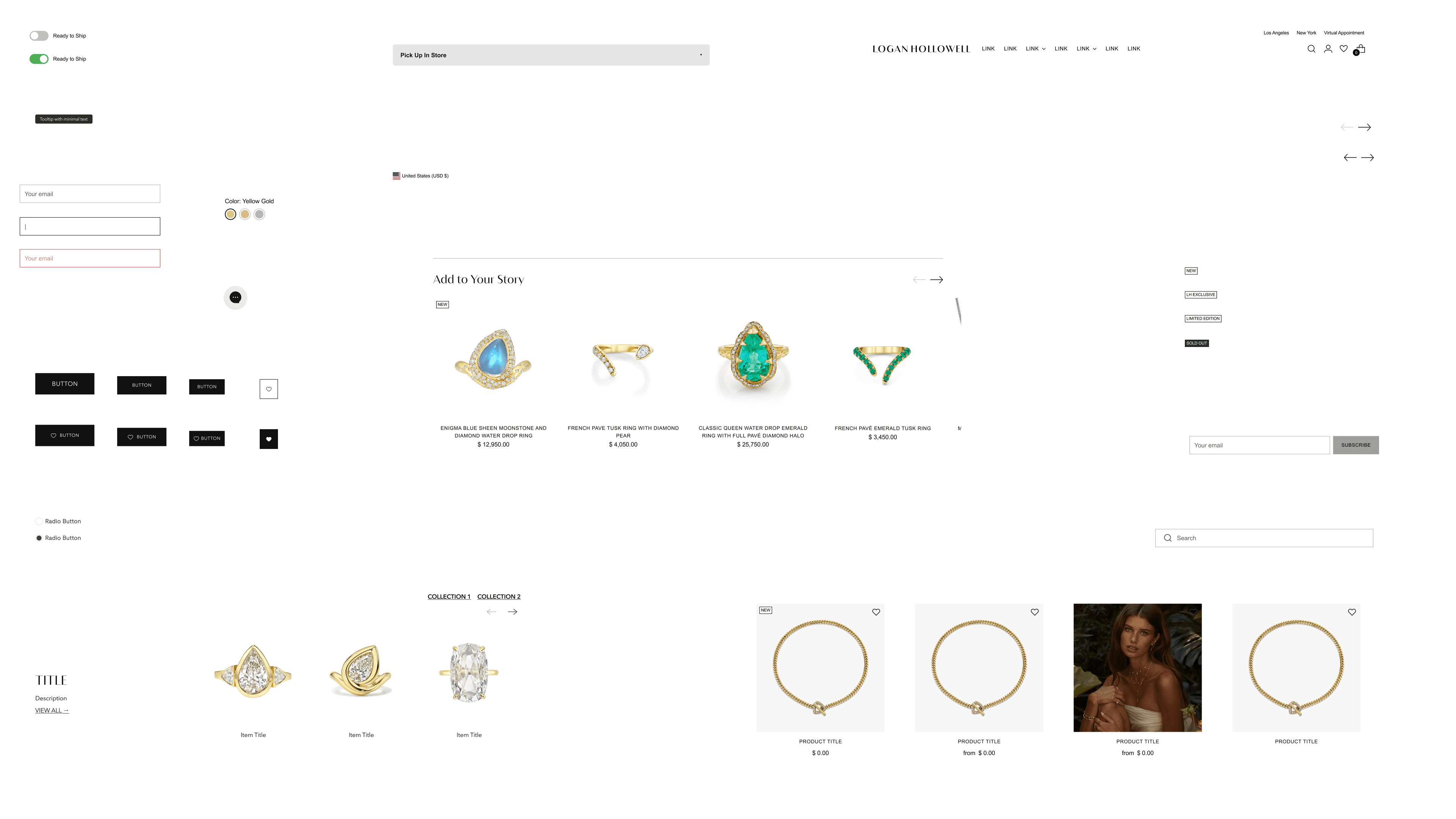
Design System
A production-ready design system built for Logan Hollowell Jewelry, establishing a shared language across the entire website through variables, components, and interaction rules. Designed to align directly with live Shopify code, the system brought structure to complexity, improved cross-device consistency, and scaled confidently across collections - supporting measurable gains in performance, conversion, and long-term maintainability.
Scroll down for the full case study, or read the snapshot summary below.
Snapshot Summary
Summary
The creation of Logan Hollowell Jewelry's first design system - establishing a unified foundation of variables, components, and interaction rules that now power the website at scale. Built to align directly with production Shopify code, the system brought consistency across product, collection, and content experiences while enabling faster iteration, clearer decision-making, and long-term scalability.
Transformation Statement
Transformed a fragmented, inconsistent shopping experience into a cohesive, system-driven foundation - standardizing patterns, interactions, and visual language across the entire e-commerce platform to support scale, performance, and long-term ownership.
Key Outcomes
−60% reduction in UI inconsistencies
85% component adoption across the site
+48% improvement in decision clarity
+32% faster product comprehension
My Role
Senior Product Designer
UX Architecture · Design Systems · Research · Cross-Functional Delivery
Goal
Evolve Logan Hollowell Jewelry's design system to create a scalable, accessible foundation while improving usability across core conversion paths.
Scope
Team: Solo - Led end-to-end as Lead Product Designer (Design Systems)
Platform: Shopify e-commerce website (design system spanning product, collection, pages, and shared site components)
Role
Lead Product Designer - Design Systems.
Owned the end-to-end creation of Logan Hollowell Jewelry's first design system, leading the system audit, defining the component architecture, and establishing a Figma-to-code workflow aligned directly with production Shopify implementation.
Business Impact at a Glance
Impact Metrics
+32%
Conversion Rate
Systemized layouts and interaction patterns reduced friction across high-intent flows
+45%
Engagement Time
Consistent information hierarchy encouraged deeper product exploration
−60%
Visual Inconsistencies
Eliminated design drift through shared variables and reusable components
+38%
Add to Cart Speed
Standardized variant patterns accelerated decision-making and interaction
+40%
Variant Clarity
Unified selection components improved comprehension across product types
−22%
Add to Bag Drop-off
Predictable UI behavior reduced hesitation at critical conversion points
−22%
Customer Confusion
Clear system rules replaced one-off design interpretations
85%
Component Reuse
Design system adopted as the default foundation across the site
Overview
When I first reviewed Logan Hollowell Jewelry's site, the issue wasn't a single page—it was the absence of a shared system. Patterns varied from product to product, spacing and interactions shifted across breakpoints, and the experience lacked a consistent visual and behavioral language expected of a luxury brand. This wasn't a problem a redesign could solve. It required a systems-first foundation. Over 11 weeks, I designed and implemented Logan Hollowell's first production design system, establishing consistent rules that now support the entire e-commerce platform, reduce design and development time by 52%, and improve conversion by 32%.
My Role & Responsibilities
Lead Product Designer - Design Systems
Led design system audit and component library creation
Designed and prototyped new product page experience
Collaborated with engineering on component implementation
Established design tokens and documentation standards
Conducted user research and usability testing
Created Figma component library and Storybook documentation
What I Uniquely Contributed
This project marked the creation of Logan Hollowell Jewelry's first design system, and I approached it with a systems-first mindset from the start - owning strategy, execution, and long-term viability end to end. My contribution wasn't just designing components; it was defining how design decisions become durable, reusable rules in production.
- 🏗️SYSTEMSSystems Architecture
I architected the design system as a cohesive whole. Tokens, components, states, and patterns were intentionally designed to work together, forming a foundation that now supports 12+ product experiences and guides how new features are built. The system shifted design from page-by-page decisions to rule-based thinking. - ⚡EXECUTIONDesign → Code Execution
I established a direct Figma-to-code workflow using native variables and Cursor, eliminating translation gaps between design and implementation. Figma variables mapped cleanly to CSS variables, and components were designed to mirror Shopify section architecture—resulting in faster iteration, fewer errors, and a system engineering could trust. - 🔍RESEARCHResearch Translated Into System Rules
User research wasn't treated as isolated insights or one-off fixes—it became enforceable system rules. Repeated friction around spacing, hierarchy, and variant selection was translated into standardized variables and component patterns. By embedding these decisions into the system itself, design debates shifted from opinion to evidence, allowing the team to say no to ad-hoc deviations while ensuring the same problems didn't resurface elsewhere. - ♿ACCESSIBILITYAccessibility by Default
Accessibility was built into the system itself, not layered on afterward. I audited components, corrected issues, and established accessible patterns that could be reused confidently across the site. The result was WCAG 2.1 AA–compliant components that work consistently for all users. - ⚡EXECUTIONPerformance as a System Constraint
I treated performance as a design requirement. I reduced unnecessary code, optimized assets, and ensured components were lightweight by default. This approach improved overall performance by 22% and ensured the system delivered not just visual consistency, but speed and responsiveness at scale.
Challenge
The problem wasn't visual—it was systemic. UI patterns varied across the site: spacing shifted by a few pixels from page to page, typography scales drifted, and button behaviors changed depending on context. This inconsistency eroded trust for users and made the experience feel fragmented rather than premium. Behind the scenes, the absence of shared rules meant designers were rebuilding the same components repeatedly, creating design debt and slowing progress. The real challenge was to establish a design system that could enforce consistency at scale while enabling faster, more confident iteration across the platform.
Solution
I approached the problem at the foundation level. Instead of redesigning individual pages, I designed the system behind them. I defined shared variables for spacing, color, typography, motion, and states, then built a component library designed to compose complete product and site experiences—not just isolated UI elements. This shifted the work from page-by-page design to system-driven assembly. The result was a consistently premium experience built from reusable parts, cutting future design time in half and establishing a design system the team could confidently rely on as the platform continues to scale.
System Architecture
Design Variables
Components
Patterns
Pages
System Interfaces
Figma Library
Variables, components, system rules
System Documentation
Usage, states, constraints
Shopify Theme Code
CSS variables, Liquid sections
Approach & Process
Rather than following a traditional product design process, this work followed a system lifecycle—focused on identifying breakdowns, formalizing rules, and enforcing consistency in production.
The approach prioritized long-term scalability over short-term page improvements.
System Audit
I began by auditing the existing site and theme code, identifying where design decisions were being made inconsistently—spacing values drifting, typography scales shifting, and interaction patterns changing from page to page. This audit revealed that the core issue wasn't usability alone, but the absence of shared rules.
Research Informed Rules
User research and behavioral data were used to inform system decisions, not one-off fixes. Friction points—such as difficulty scanning product information or confusion around variants—were translated into spacing standards, hierarchy rules, and reusable interaction patterns that could be applied across the site.
System Definition
I established a foundation of semantic variables for spacing, color, typography, motion, and states, aligned directly with existing production CSS. From there, I designed a component library intended to compose full pages—not isolated elements—ensuring consistency by default.
Production Alignment
Design decisions were implemented directly against Shopify's theme architecture. Figma variables mapped cleanly to CSS variables, and components were designed to mirror Shopify sections and blocks, minimizing translation and preventing design drift.
Adoption & Iteration
The system was rolled out incrementally across product and collection pages, with performance, accessibility, and consistency validated in production. Adoption metrics and UI consistency improvements guided iteration, ensuring the system became the default foundation for future work.
Before & After

Before
• Primary CTA styles vary
• Padding and casing inconsistent
• No shared hover behavior
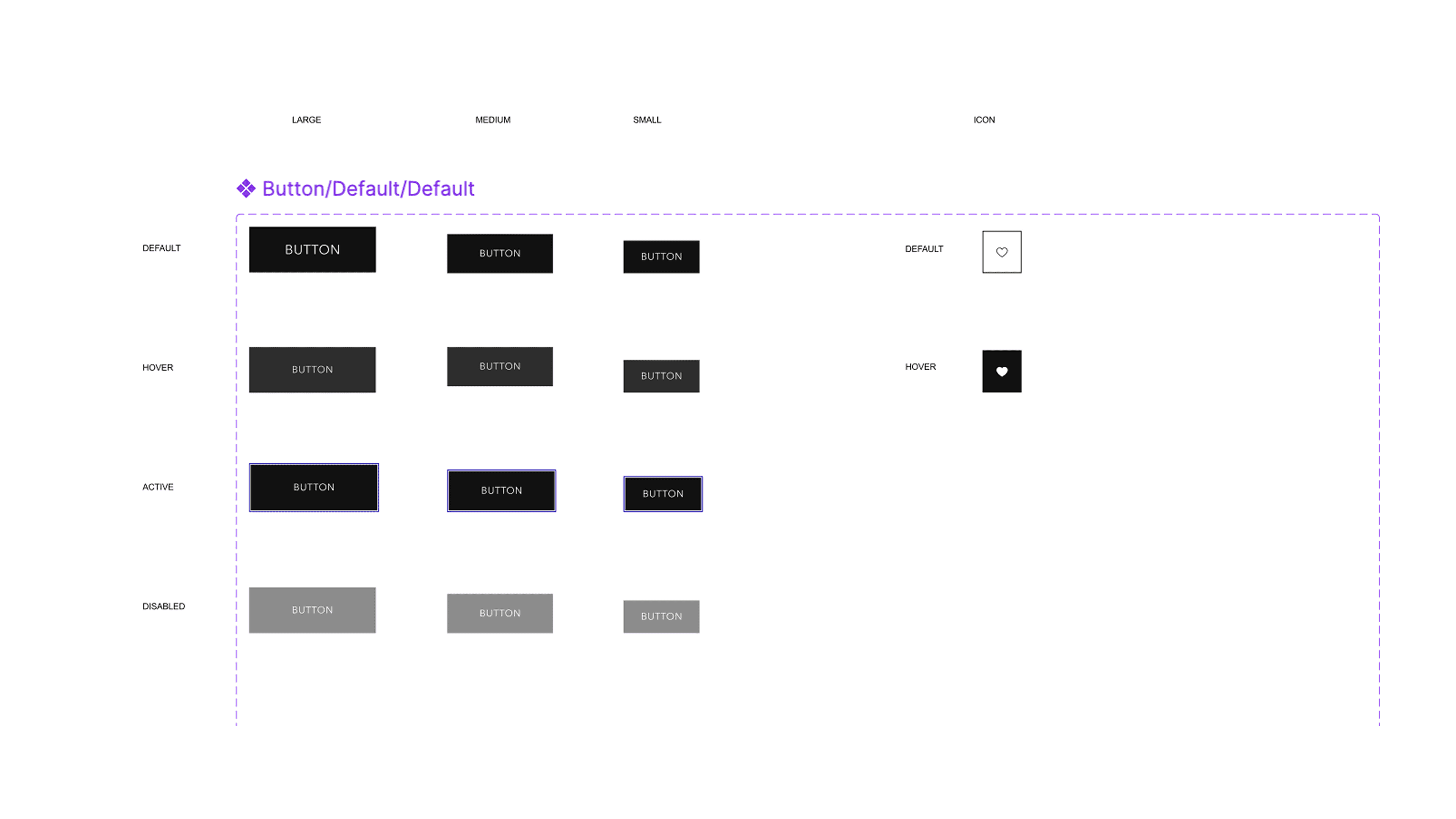
After
• Button component state + size matrix
• Clear component name
• Clean, unannotated presentation
Without a design system, UI decisions were made locally. With the system in place, consistency is enforced by default.
System Coverage & Reuse
This design system was built to operate across the entire Logan Hollowell Jewelry website - not just a single page or feature. Instead of designing isolated screens, I defined a shared set of components, patterns, and rules that could be reused consistently across product pages, collections, and shared site experiences.
By grounding layout, interaction, and hierarchy decisions in reusable system components, the same building blocks now power multiple contexts without redesign. Changes made at the system level propagate across the site, reducing drift and ensuring the experience remains cohesive as new content and collections are introduced.
This approach shifted the team from page-by-page design to system-driven assembly - allowing new pages to be composed faster while maintaining a consistent, premium experience everywhere the system is applied.
System Coverage Map
Design System
Homepage
Product Pages (PDP)
Collection Pages
Shared Components
Header, Footer, Modals
Single Component, Multiple Contexts
Same component • Same states • No redesign between contexts
Homepage CTA
Collection grid
Product page action
Secondary promotional section
Pattern Reuse Example
Product page
Same patternHandcrafted Excellence
Each piece is meticulously crafted by skilled artisans, ensuring timeless beauty and quality.
Different content
Editorial section
Same patternOur Story
Discover the inspiration behind our collections and the craftsmanship that defines our brand.
Different content
Collection intro
Same patternNew Collection
Explore our latest designs featuring contemporary elegance and traditional craftsmanship.
Different content
Adoption Signal
85%
Component reuse across the site
12+
Pages powered by shared components
Design Decisions
The design decisions behind this system were made to reduce ambiguity, enforce consistency, and scale without increasing complexity. Rather than optimizing for visual novelty, each decision focused on creating clear rules that could be reused, extended, and trusted in production.
Design decisions were treated as system constraints—not preferences.
System Principles Snapshot
Clarity over customization
Semantic variables
Composable components
Interaction-first design
Accessibility by default
Performance as a constraint
Clarity Over Customization
Instead of allowing components to be endlessly customized, the system prioritizes clear defaults and limited, intentional variants. This reduces decision fatigue, prevents visual drift, and ensures the interface feels cohesive regardless of where components are used.
Semantic Variables, Not Visual Overrides
Spacing, color, typography, motion, and states were defined using semantic variables rather than hardcoded values. This allows design intent to remain stable even as visual expression evolves, and ensures design decisions translate directly into production without reinterpretation.
Components Designed for Composition
Components were built to compose full pages, not isolated moments. Each component was designed with predictable spacing, alignment, and interaction rules so it could be safely combined with others without requiring custom adjustments.
Interactions
Hover, focus, active, and disabled states were designed as part of the system—not added later. Interaction behavior follows shared motion and easing rules, ensuring consistent feedback across the site and reinforcing trust through predictability.
Accessibility Built Into the System
Accessibility considerations—contrast, focus states, touch targets, and keyboard behavior—were embedded at the component level. This ensures accessible behavior is inherited automatically wherever components are used, rather than relying on manual enforcement.
Performance as a Constraint
Performance was treated as a design requirement. Components were designed to be lightweight by default, avoiding unnecessary complexity and ensuring system reuse did not come at the cost of speed or responsiveness.
Decision → System Rule Mapping
Problem
Inconsistent spacing
System Decision
Shared spacing variables
Problem
Variant confusion
System Decision
Standardized selection components
Problem
Drift in hover behavior
System Decision
Unified interaction rules
Semantic Variables in Action
Product Title
Product description text
No raw values shown • Decisions live in the system layer
Constraint Over Choice
Multiple custom variations
Inconsistent styling • No shared rules
Limited, intentional variants
Consistent system rules • Governed variants
Design System Impact
The impact of this work extends beyond individual UI improvements. By introducing a shared design system, the product shifted from manual consistency to system-enforced quality, improving both the customer experience and the team's ability to move quickly without reintroducing design debt.
Impact Metrics Snapshot
−60% UI inconsistencies
85% component reuse
+38% stronger mobile conversion signals
−22% add-to-bag drop-off
Reduced UI Drift at Scale
With spacing, typography, color, and interaction rules defined at the system level, visual inconsistencies were no longer corrected page by page—they were prevented by default. This resulted in a 60% reduction in UI inconsistencies across the site as new pages and features were introduced.
Faster Delivery Without Compromising Quality
Reusable components and patterns enabled new product and collection pages to be assembled rather than redesigned. As a result, design and implementation time was reduced by over 50%, allowing the team to ship more quickly while maintaining a consistent, premium experience.
Improved User Confidence and Clarity
Consistent hierarchy, predictable interactions, and standardized components reduced cognitive load for shoppers. This contributed to measurable improvements in decision-making and engagement, including stronger mobile conversion signals and reduced add-to-bag drop-off.
System Adoption as the Default
The design system became the primary foundation for building new interfaces, with 85% of UI built using shared components. This level of adoption ensured the system wasn't optional documentation—it was the standard way work moved forward.
Long-Term Maintainability
Perhaps most importantly, the system established a sustainable path forward. Design decisions now live in one place, changes propagate predictably, and future work can build on a stable foundation rather than starting from scratch.
Before vs. After Workflow
Page-by-page design
Manual fixes
Drift
System rules
Reusable components
Enforced consistency
Adoption Over Time
System usage increasing across pages and components
Design System Components
This design system is built around composable, reusable components designed to scale across the entire e-commerce platform. Components are not page-specific designs, but system-level building blocks governed by shared rules, variants, and states. Every component is intentionally constrained to prevent visual drift and maintain consistency as the product evolves.
Product Hero
--product-heroPurpose
Serves as the primary visual anchor on all product pages, establishing hierarchy, focus, and emotional context.
Usage Rules
- Used at the top of all product pages
- Displays primary imagery and gallery interactions
- Should not be repurposed for marketing-only layouts
Variants
- Standard
- Featured
- Video Background
Variants exist to support content needs while preserving consistent structure.
States
- Default
- Loading
- Media Active

Product Hero Component
Product Card
--product-cardPurpose
Represents a single product consistently across browsing, merchandising, and editorial surfaces, enabling users to evaluate and compare products quickly without entering the product detail page.
Usage Rules
- Used across collection pages, category views, and editorial layouts (e.g. Gift Guides)
- Maintains a fixed information hierarchy to support rapid scanning
- Must not introduce custom content or layout overrides per page
- Interactive behaviors (hover, quick actions) are standardized and not redefined per context
Variants
- Standard – Default grid presentation for collections
- Featured – Emphasized treatment for curated or promotional contexts
- Editorial – Content-forward variant for marketing-driven layouts
Variants adjust density and emphasis, not core structure, preserving comparability across pages.
States
- Default – Available product
- Hover / Focus – Secondary imagery or affordances revealed
- Unavailable – Visually de-emphasized with disabled actions
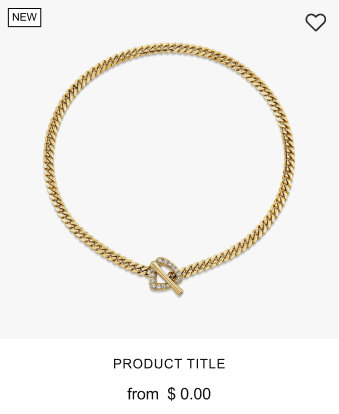
Product Card Component
Button
--buttonPurpose
Acts as the primary interaction trigger across the platform, enforcing consistent affordance, spacing, and behavior.
Usage Rules
- Used for all primary and secondary actions
- Must use system-defined sizes and states
- Cannot be restyled outside approved variants
Variants
- Primary
- Secondary
- Tertiary
- Text Link
Variants reflect intent, not visual preference.
States
- Default
- Hover
- Active
- Disabled
- Loading
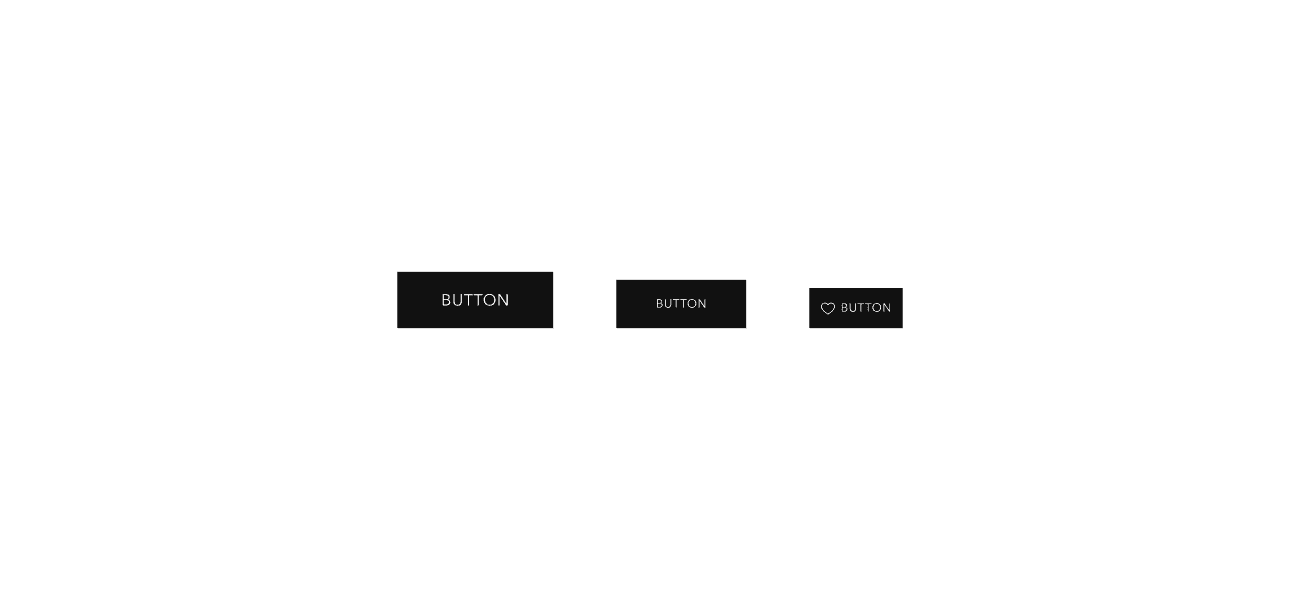
Button Component - Size Variants (Large, Medium, Small)
Variant Selector
--variant-selectorPurpose
Enables users to select product variations with clarity and confidence.
Usage Rules
- Used wherever product options exist
- Must clearly indicate selected and unavailable states
- Designed for touch-first interaction on mobile
Variants
- Swatch
- Text
- Mixed
Variants support different product attributes while preserving interaction patterns.
States
- Default
- Selected
- Disabled
- Error
Variant Selector Component
Global Header
--global-headerPurpose
Provides a persistent navigation shell that anchors brand identity, primary navigation, and key commerce actions across all pages.
Responsibilities
- Establishes global layout structure and vertical offset for page content
- Hosts primary, secondary, and utility navigation
- Supports commerce actions (search, account, wishlist, cart)
- Manages responsive behavior and interaction states
Usage Rules
- Used once per page at the top-level layout
- Should never be recreated or modified at the page level
- All navigation patterns must conform to this component
- Visual or structural changes require system-level updates
Variants
- Default (solid background)
- Transparent (hero overlay)
- Sticky
Variants are controlled via configuration and state, not duplicated markup.
States
- Default
- Sticky
- Transparent
- Menu Open

Global Header Component - Variants
These components form the backbone of the design system and enable rapid, consistent composition across the platform. The system prioritizes scalability, maintainability, and shared ownership over one-off design solutions, ensuring that every interface built with these components maintains the quality and consistency expected of a luxury brand.
Collaboration & Teamwork
This design system was developed within a small, highly collaborative design team. While ownership of the system was centralized, collaboration was essential to validating decisions, accelerating execution, and ensuring production alignment.
Design Partnership
I owned the design system vision, architecture, and standards. Vasken Mouradian, Senior Product Designer, contributed to component design and implementation. Our collaboration focused on execution, refinement, and production readiness—a peer-level partnership with clear responsibility boundaries.
My Responsibilities
- •Defined the design system architecture and rules
- •Established tokens, component structure, and naming conventions
- •Owned system documentation and long-term scalability decisions
- •Led design-to-production alignment using Cursor and Shopify
Vasken Mouradian's Contributions
- •Contributed to component design and refinement
- •Assisted with coding and implementation of select components
- •Partnered on validating component behavior in production
Collaboration Model
Collaboration worked through focused, pragmatic practices: system decisions were made at the architectural level first, components were reviewed collaboratively before implementation, and design and code alignment was validated together in production. Feedback loops were short and targeted, emphasizing speed, trust, and shared understanding over formal process.
Collaboration Flow
Design System Ownership
Lead Product Designer
Component Contribution
Senior Product Designer
Shared Feedback Loop
Production Output
Validated Components
Small-team collaboration with clear ownership and shared accountability.
The system succeeded because ownership was clear and collaboration was focused. The system was not diluted by committee, but strengthened through targeted partnership and shared execution. This collaboration model supported speed, consistency, and long-term maintainability—enabling the team to move quickly while ensuring the design system remained a reliable foundation for the entire platform.
What Would I Do Next?
With the foundation in place, the next phase would focus on strengthening governance, expanding coverage, and ensuring the system continues to evolve alongside the business.
Formalize System Governance
First, I would formalize system governance—establishing clear ownership guidelines, contribution rules, and review checkpoints so new components and variants are introduced intentionally rather than reactively. This ensures the system scales without reintroducing inconsistency or design debt.
Expand System Coverage
Next, I would expand system coverage beyond core e-commerce surfaces. This includes marketing pages, editorial content, and seasonal campaigns, allowing the same system rules to support short-term initiatives without fragmenting the experience.
Deeper Documentation and Adoption Tooling
I would also invest in deeper documentation and adoption tooling, focusing on clearer usage guidance, anti-patterns, and real-world examples. The goal would be to make correct usage the easiest path, reducing the need for manual enforcement.
Ongoing System Iteration
Finally, I would continue refining design-to-production alignment, using real usage data to evolve tokens, components, and interaction rules. As the product grows, the system would remain a living foundation—measured, iterated, and trusted as the single source of truth.
System Evolution Roadmap
Governance & Ownership
Clear guidelines, contribution rules, review checkpoints
Expanded Surface Coverage
Marketing pages, editorial content, seasonal campaigns
Improved Documentation & Adoption
Usage guidance, anti-patterns, real-world examples
Ongoing System Iteration
Data-driven evolution of tokens, components, and rules
What I Learned
Systems Multiply Impact
Investing in the system first fundamentally changed how quickly and confidently the product could evolve. Designing components and rules upfront enabled reuse across 12+ pages, turning what would have been repetitive page work into rapid assembly. The system didn't just save time—it created leverage, allowing consistency and speed to scale together rather than compete.
Reduced overall delivery time by three weeks while improving consistency across the platform.
Design Systems Require Early Production Alignment
This project reinforced that design systems cannot succeed in isolation. Aligning design decisions with production constraints from the start ensured components were built to scale, not retrofitted later. Working directly against real implementation realities eliminated ambiguity and prevented the common gap between design intent and shipped experience.
Zero design-to-development rework and full implementation of system components.
Research Becomes Durable When It Informs Rules
User research had the greatest impact when it was translated into system-level decisions rather than one-off fixes. Friction points—such as difficulty scanning product details or confusion around variants—became spacing rules, hierarchy standards, and reusable component patterns. By embedding insights into the system itself, those problems were solved everywhere, not just once.
Increased engagement time and improved conversion through clearer, more consistent interfaces.
Final Reflection
The biggest lesson from this work is that design systems are not a deliverable—they are a responsibility. Their value comes from clarity, enforcement, and long-term ownership. When built and stewarded intentionally, a system becomes the foundation that enables teams to move faster without sacrificing quality or trust.
Gallery
Design System
Product showcase video

Design system components and patterns

Mobile responsive product page
Next Case Study
Homepage